Handyman software for quote-ready small jobs
Task lists, work areas, materials, dimensions, access, timing, urgency, and photos on every request — then operator-confirmed quotes, scheduled work orders, proof photos, and invoices.
No credit card required. Signup starts you on the Handyman Service setup — you can change your business type later.
Who it's for
Handyman and small property-repair businesses quoting service calls, punch lists, labor blocks, and property-manager work orders.
The job to be done: Turn task lists, dimensions, materials, access, timing, urgency, and photos into operator-reviewed quotes and scheduled work orders.
Sound familiar?
The problems that eat evenings in a handyman service business.
Volume is the enemy
Six small jobs a day means six sets of scheduling, notes, photos, and invoices. Any manual step, multiplied by thirty a week, becomes the whole evening.
Property managers need paperwork your way of working doesn't produce
PO numbers on invoices, a reference per unit, photos of completed work — miss them and payment waits another cycle.
“Done” is invisible
A fixed gate latch looks like a gate. Before-and-after photos are the difference between trust and a dispute.
Multi-visit projects lose their thread
The deck repair that takes three Saturdays needs its phases and its billing to stay connected.
How FieldLasso runs your day
Capture the request before the quote
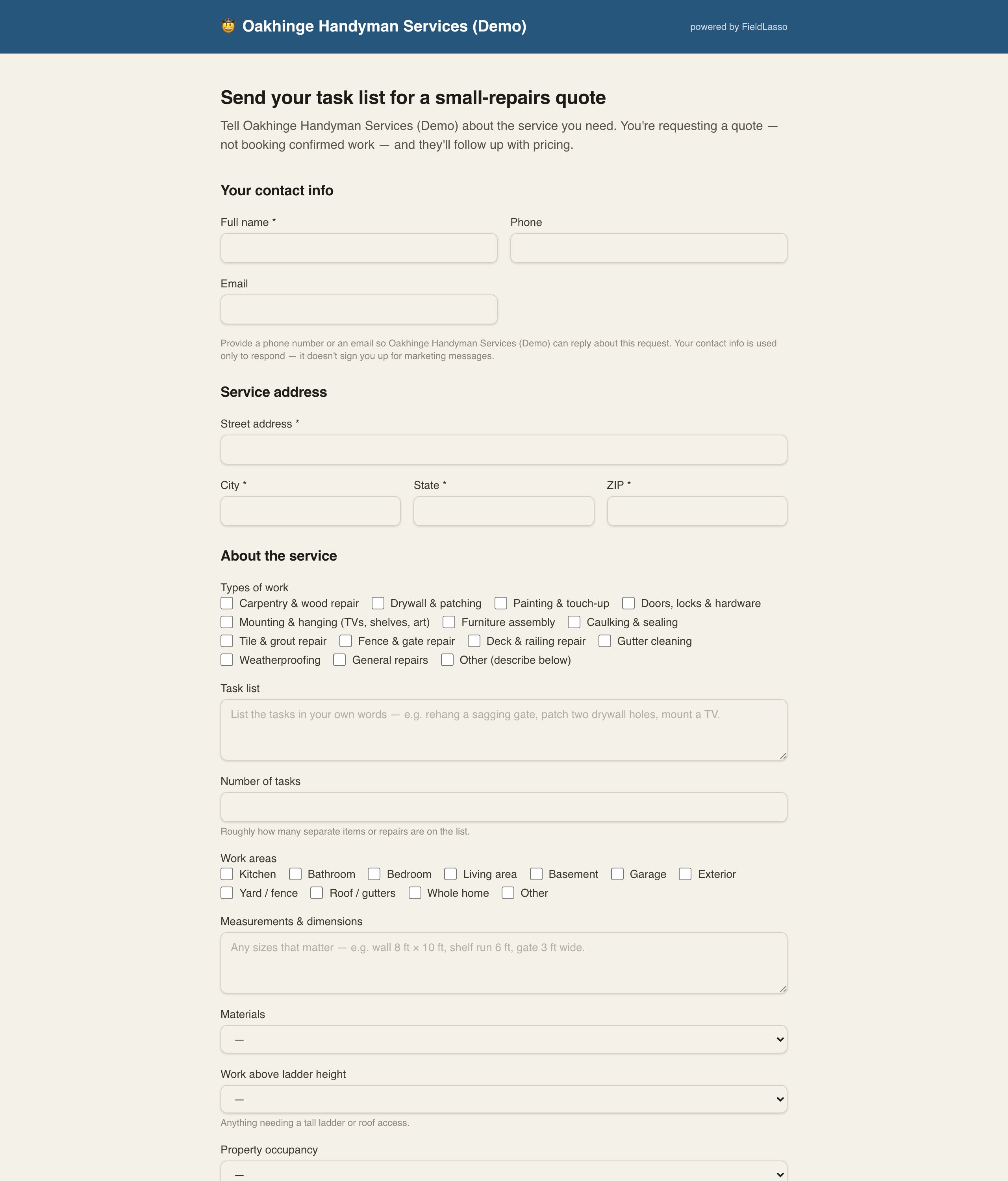
Customers use your branded page to send task categories, a task list, item count, work areas, dimensions, material status, access notes, requested timing, urgency, and photos.
Apply an operator-reviewed template
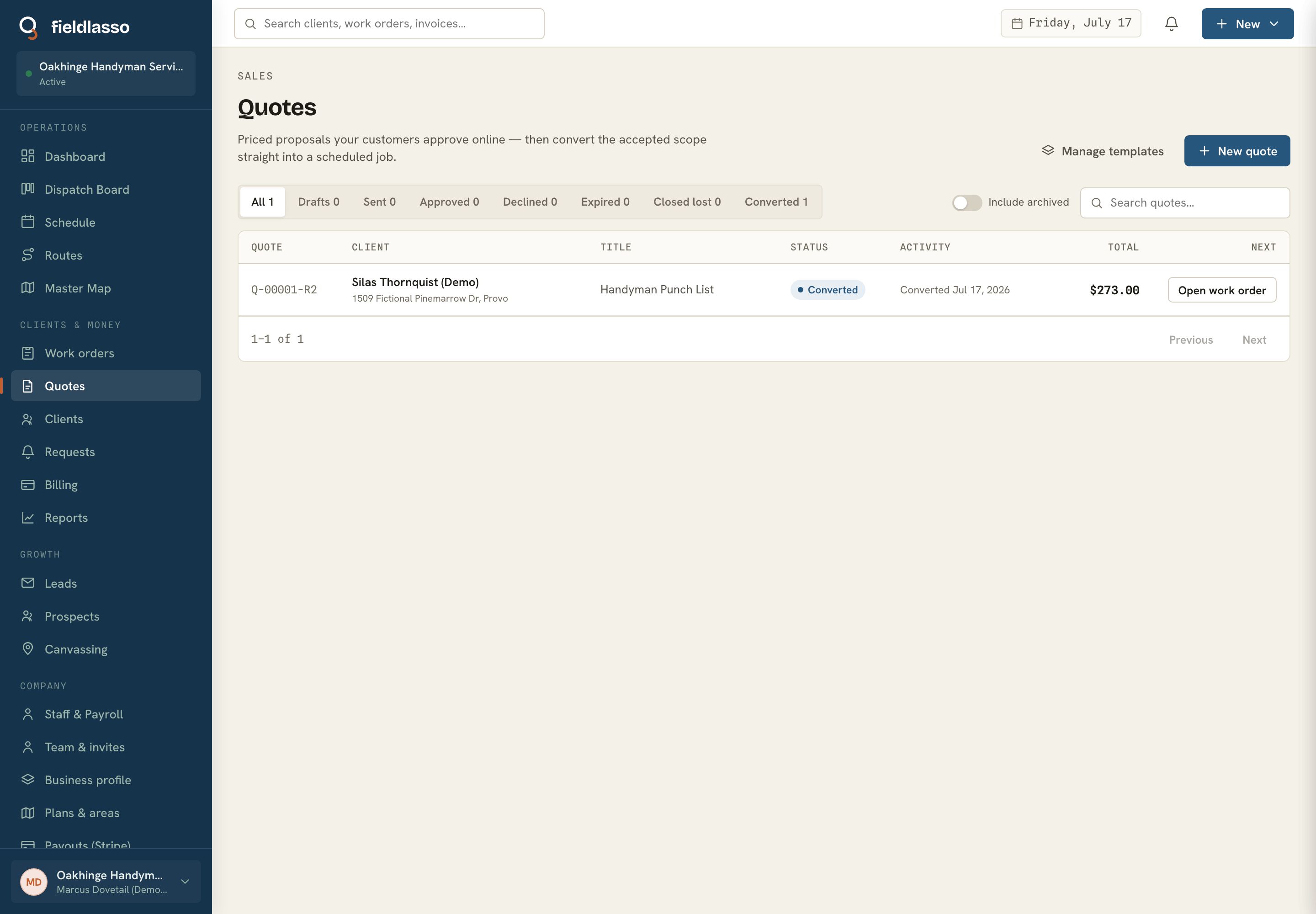
Built-in service call, punch list, half-day, full-day, and property-work-order quote documents start with unset prices. You confirm the scope and price before sending.
Schedule the work order
Drag approved work orders between days and techs. The field app shows the task list, work areas, materials status, access notes, and photos attached to the job.
Invoice with the references attached
Completed work orders become invoices carrying the customer PO number and project phase, paid by card, autopay, or check.
Built for handyman service
The Handyman Service pack calls work orders what you call them, and the intake below is the real request and job fields the product asks for — not a generic feature list.
Types of work
Carpentry, drywall, painting, hardware, mounting, assembly, caulking, tile/grout, fences, decks, gutters, and other operator-reviewed tasks.
Task list
The customer's plain-language list — the starting point for a quote instead of a vague phone note.
Number of tasks
A rough item count to help the operator decide whether this is a service call, punch list, or labor block.
Work areas
Kitchen, bathroom, garage, exterior, yard/fence, roof/gutters, whole home, or another area, carried from intake to the job.
Measurements & dimensions
Customer-supplied sizes that help scope the quote, without turning the page into an estimating standard.
Materials
Whether materials are on site, supplied by the business, partly available, or unknown.
Work above ladder height
A yes/no flag for elevated work so the operator can review fit before accepting the job.
Property occupancy
Occupied or vacant, captured on the service location.
Parking & access
How the tech gets in, where to park, gate codes, and pets to expect.
Requested timing
Specific date, a few days, a couple of weeks, or flexible.
Urgency
Emergency, urgent this week, standard, or no rush — an operator triage field, not an automatic promise.
Customer PO number
Shown on the invoice — the field that gets property-management invoices paid on the first pass.
Project phase
On the invoice for multi-visit projects, so billing for phase two doesn't look like a duplicate of phase one.
Customer reference
A second reference line on invoices for clients who track work their own way.
Starter template
Handyman service-call quote
A small-repair service call using the task list, work areas, materials status, dimensions, access, timing, urgency, and photos from intake. Pricing is operator-confirmed.
You confirm every price during setup — FieldLasso never publishes a market rate for you.
Good fit / not a fit
The honest version — who FieldLasso is built for here, and who it is not.
A good fit if you are…
- Small residential repairs, punch lists, and assembly/install work the operator chooses to offer
- Property-manager work orders that need references and photos
- Businesses that want intake photos before quoting and proof photos after work
Not the right tool for…
- Ground-up construction, remodels, or project-heavy contractor management
- Regulated trade work or scope decisions that require outside professional judgment
- Detailed material take-offs and supplier price books
Handyman scope and estimate checklist
What to capture before quoting — task categories, item count, rooms or exterior areas, measurements, materials, parking/access, requested timing, urgency, and photos.
- Types of work — Carpentry, drywall, painting, hardware, mounting, assembly, caulking, tile/grout, fences, decks, gutters, and other operator-reviewed tasks.
- Task list — The customer's plain-language list — the starting point for a quote instead of a vague phone note.
- Number of tasks — A rough item count to help the operator decide whether this is a service call, punch list, or labor block.
- Work areas — Kitchen, bathroom, garage, exterior, yard/fence, roof/gutters, whole home, or another area, carried from intake to the job.
- Measurements & dimensions — Customer-supplied sizes that help scope the quote, without turning the page into an estimating standard.
- Materials — Whether materials are on site, supplied by the business, partly available, or unknown.
- Work above ladder height — A yes/no flag for elevated work so the operator can review fit before accepting the job.
- Property occupancy — Occupied or vacant, captured on the service location.
- Parking & access — How the tech gets in, where to park, gate codes, and pets to expect.
- Requested timing — Specific date, a few days, a couple of weeks, or flexible.
- Urgency — Emergency, urgent this week, standard, or no rush — an operator triage field, not an automatic promise.
- Customer PO number — Shown on the invoice — the field that gets property-management invoices paid on the first pass.
- Project phase — On the invoice for multi-visit projects, so billing for phase two doesn't look like a duplicate of phase one.
- Customer reference — A second reference line on invoices for clients who track work their own way.
Free to use and print — no email required.
Free handyman service tools
- Handyman scope & estimate worksheetOrganize a small-job scope and estimate from your own task list, labor, materials, travel, overhead, and deposit assumptions - with no market-rate defaults.
Free to use and print — no email required.
Where FieldLasso draws the line
What this pack does not do, so there are no surprises.
- Quotes and work orders carry the prices you set — FieldLasso doesn't suggest market rates or generate estimates for you.
- FieldLasso records scope and operator decisions; it does not decide trade requirements, permits, or whether a task belongs on your service menu.
- Payroll and invoicing are built in, but totals don't push into separate bookkeeping software on their own.
Handyman Service FAQ
What can a customer send before I quote a handyman job?
The public request can collect work categories, a task list, item count, work areas, dimensions, materials status, access notes, requested timing, urgency, and photos.
Can invoices carry PO numbers for property managers?
Yes — customer PO number and customer reference are invoice fields shown on the invoice, and project phase keeps multi-visit billing clear.
How do I keep photos organized across many small jobs?
Photos attach to the work order they belong to, taken in the field app, and they are offline-safe until synced. Customers can see them in their portal.
Does FieldLasso decide whether a job should be handled as construction or regulated trade work?
No. FieldLasso records the request and operator-entered scope. Your business decides what work it offers and what requirements apply before quoting.
How fast can I invoice after finishing?
Immediately — invoices generate from completed work orders, and you can collect card payment on site through Stripe-hosted entry.
What does FieldLasso cost?
Starter is $49/month, Pro is $149/month, and Scale is $299/month. Every plan starts with a 14-day free trial and no credit card is required to try it.
Source notes
Reviewed July 15, 2026. These sources establish market context and software intent only; they do not support a search-volume, market-share, competitor-performance, or pricing claim.
Related industries
No credit card required. Signup starts you on the Handyman Service setup — you can change your business type later.