Water damage restoration software for the whole case file
Water category, loss class, moisture readings, and drying equipment on every case — with the claim number and carrier details attached from first call to final invoice.
No credit card required. Signup starts you on the Water Damage Restoration setup — you can change your business type later.
Who it's for
Water-damage mitigation crews managing insurance-claim dry-outs.
The job to be done: Assign a crew in minutes, build the claim file with readings and photos, and invoice with the claim number on it.
Sound familiar?
The problems that eat evenings in a water damage restoration business.
The 2 a.m. call tests your whole system
A flooded kitchen needs a crew assigned in minutes, not a morning-after voicemail chain.
The claim file is your paycheck
Category, class, moisture readings, equipment placed, photos of everything — thin documentation means slow, contested payment.
Daily monitoring visits pile up
Every active dry-out needs daily readings until it's done. Tracking which jobs still have equipment deployed is its own job.
Claim details scatter
Carrier, claim number, adjuster contact — spread across texts and sticky notes, they slow every conversation that matters.
How FieldLasso runs your day
Open the case with the loss details
Incident date, cause of loss, insurance carrier, claim number, and adjuster contact captured on the client and case from the first call.
Dispatch the mitigation crew
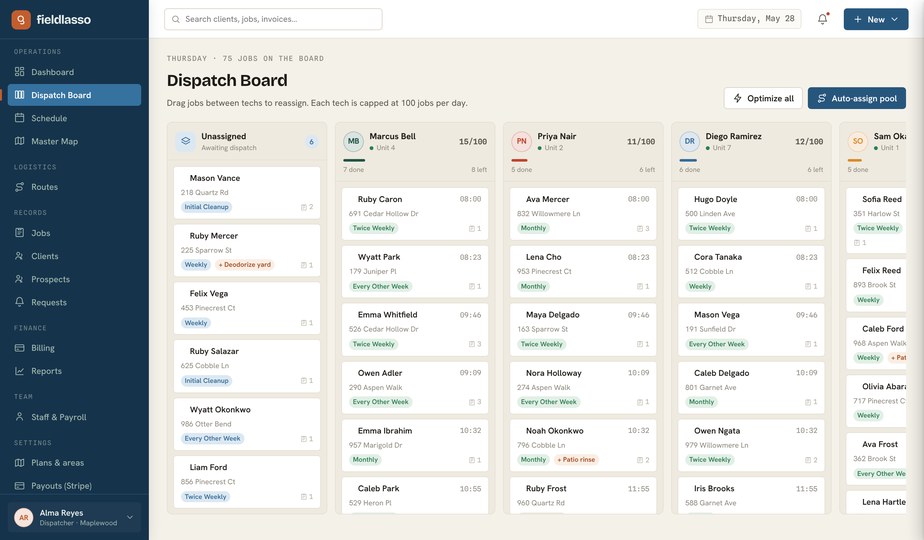
Drag the case onto the on-call crew on the dispatch board and get trucks moving.
Document the dry-out daily
Record water category, loss class, moisture readings, and drying equipment on each visit from the operator console. The field app displays those details, while photos remain offline-safe in stripped-out basements.
Invoice with the claim on it
Completed work generates invoices with the claim number shown on them, and payments run through Stripe or recorded checks.
Built for water damage restoration
The Water Damage Restoration pack calls cases what you call them, and the intake below is the real request and job fields the product asks for — not a generic feature list.
Water category
Category 1, 2, or 3 — required on every case, recorded at assessment.
Loss class
Class 1 through 4, the second required half of the loss assessment.
Moisture readings
Daily readings logged per visit, building the drying record the file needs.
Drying equipment deployed
Which air movers and dehumidifiers are on site — so pickup day doesn't rely on memory.
Claim number
On the client record and shown on the invoice, so billing matches the file.
Adjuster contact
Name and number with the client, not in somebody's text history.
Starter template
Mitigation case
A loss case that records water category, loss class, daily moisture readings, and drying equipment, with carrier and claim number on the client. Pricing is operator-confirmed.
You confirm every price during setup — FieldLasso never publishes a market rate for you.
Good fit / not a fit
The honest version — who FieldLasso is built for here, and who it is not.
A good fit if you are…
- Residential mitigation and dry-out work
- Crews doing daily monitoring visits until pickup
- Businesses that need the claim number on invoices
Not the right tool for…
- Reconstruction and rebuild project management after mitigation
- Carrier estimate-software integration or automated claim submission
Water-damage case intake checklist
What to capture on the first call — cause of loss, carrier, claim number, and adjuster contact — so the case file starts complete.
- Water category — Category 1, 2, or 3 — required on every case, recorded at assessment.
- Loss class — Class 1 through 4, the second required half of the loss assessment.
- Moisture readings — Daily readings logged per visit, building the drying record the file needs.
- Drying equipment deployed — Which air movers and dehumidifiers are on site — so pickup day doesn't rely on memory.
- Claim number — On the client record and shown on the invoice, so billing matches the file.
- Adjuster contact — Name and number with the client, not in somebody's text history.
Free to use and print — no email required.
Where FieldLasso draws the line
What this pack does not do, so there are no surprises.
- FieldLasso stores the records you enter; it doesn't recommend products, chemicals, settings, or methods, or verify code or regulatory compliance — that stays your professional judgment.
- Payroll and invoicing are built in, but totals don't push into separate bookkeeping software on their own.
Water Damage Restoration FAQ
Can I record category and class on every loss?
Yes — water category (1–3) and loss class (1–4) are required fields on every case in the restoration pack.
How do daily monitoring visits work?
Schedule follow-up visits for each active case; the office records moisture readings and equipment status for each visit, and techs can reference them in the field app until pickup.
Do invoices reference the insurance claim?
Yes. The claim number is captured on the client and shown on invoices, and carrier and adjuster contact stay on the client record.
Do photos work in flooded basements with no signal?
Yes — photos, time, and mileage are offline-safe in the native field app and sync when coverage returns.
What does FieldLasso cost?
Starter is $49/month, Pro is $149/month, and Scale is $299/month. Every plan starts with a 14-day free trial and no credit card is required to try it.
Source notes
Reviewed July 15, 2026. These sources establish market context and software intent only; they do not support a search-volume, market-share, competitor-performance, or pricing claim.
Related industries
No credit card required. Signup starts you on the Water Damage Restoration setup — you can change your business type later.